Basic document creation
Updated date: 11/11/2025
Updated by: VNPT eContract's team
Describes the basic document creation workflow when integrating the organization’s management system with VNPT eContract.
If the customer’s system has already generated the document file (.docx or .pdf) — and all editing or content preparation is performed entirely outside of VNPT eContract — the organization only needs to use this file and follow the processing steps below.
Process flow
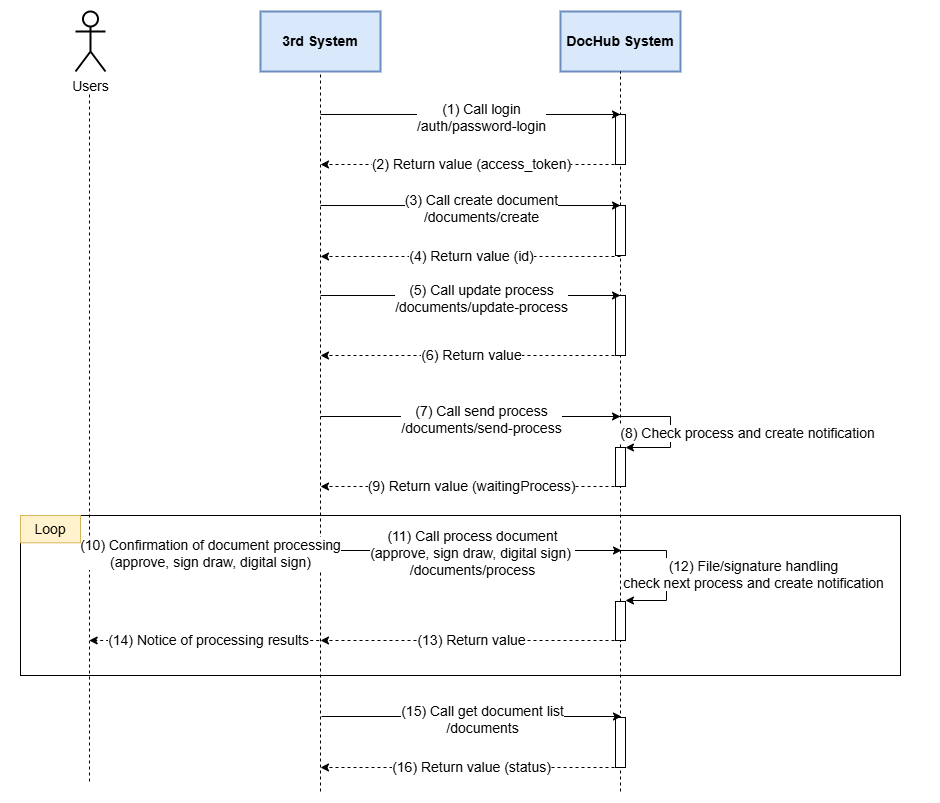
Process Explanation
- The customer’s management system generates the document file in .docx or .pdf format.
- Call the login (1) API to authenticate and obtain an access token for subsequent operations.
- Call the document type list and department list APIs to retrieve the document type ID and department ID.
- Call the create document (3) API to create a new document and obtain the document ID (4).
- Call the update document process (5) API to define the processing workflow (including processing steps and assigned users).
- After updating the workflow, call the send document process (7) API. The system will validate the workflow, notify the assigned processor (8), and return the
waitingProcessinformation of the next processor. - Each user in the workflow will receive notifications via email/SMS/application and perform the required document action (approval, e-signature, digital signature) (10 + 11). The system processes the signature, updates the status, and moves to the next user, repeating until the final step is completed.
- Call the document list API to retrieve the document status (15), processing history, and related information. This data can optionally be synchronized back to the customer’s management system.
caution
- The above flow omits interactions between VNPT eContract and digital signing systems, HSM, authentication systems, etc.
- Depending on the unit’s operations, the Document Processing Call step (10 - 11) may vary: the user might interact directly with VNPT eContract without going through a 3rd System (in cases where the user uses VNPT eContract’s web view for signing).
- The Document List Call step (15) may be optional, depending on the unit’s data synchronization purposes.